Visualizing DSA: Practicing Merge Sort with Excalidraw
Visualizing DSA: Practicing Merge Sort with Excalidraw
I've noticed that most of my confusion with DSA doesn't come from the code itself — it comes from not being able to picture what the algorithm is doing before I start typing. Recursion especially. You can read the function ten times and still not "see" the calls stacking up.
So for Merge Sort, I tried something different. Before writing a single line of Java, I opened Excalidraw and drew the whole thing by hand.
Starting Point
I picked a random unsorted array:
[4, 1, 5, 9, 0, 3, 6, 7, 2, 8]
And just started boxing it up on the canvas.
Dividing the Array
Merge Sort is Divide and Conquer, so the first half of the drawing was just splitting the array in half, again and again, until every box had one number in it.
[4, 1, 5, 9, 0, 3, 6, 7, 2, 8]
              ↓
   [4, 1, 5, 9, 0]     [3, 6, 7, 2, 8]
              ↓
          keep splitting
              ↓
     [4] [1] [5] [9] [0] [3] [6] [7] [2] [8]
Drawing this part was actually the most useful bit. On paper (or code), the recursive calls feel abstract. On the canvas, each split is just a box turning into two boxes. It made the base case — a single element is already sorted — feel obvious instead of like a rule I had to memorize.
Merging Back
The second half is where Excalidraw actually earned its place in this workflow. I drew arrows connecting pairs of boxes as they merged, and wrote the sorted result above each pair.
[4] + [1]  →  [1, 4]
[5] + [9]  →  [5, 9]
[1, 4] + [5, 9]  →  [1, 4, 5, 9]
Same thing on the other half of the array, until both sides were fully sorted and merged one last time:
[0, 1, 2, 3, 4, 5, 6, 7, 8, 9]
Being able to trace an arrow from one box to the next made it obvious why the merge step compares elements pairwise instead of just concatenating arrays. That's something I'd read before but never really felt until I drew it.
The Full Diagram
Here's the actual board from Excalidraw — every split going down, every merge coming back up:
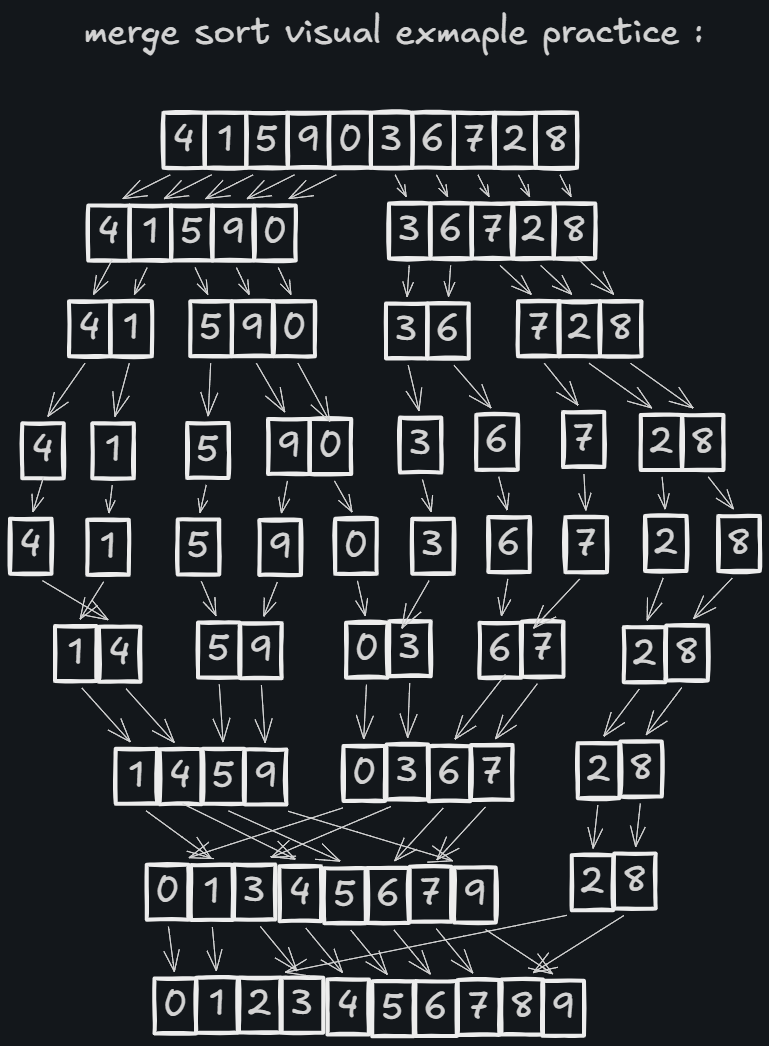
Seeing it as one connected diagram, rather than separate code blocks, is what made it click. You can literally follow a single number — say the 9 — all the way from the original array, through every split, into a solo box, and then back through each merge until it lands in its final sorted position.
Why This Worked Better Than Just Reading Code
A few things stood out:
- No syntax to worry about — I could focus entirely on the logic, not on brackets or semicolons.
- Mistakes were visible immediately. If a merge step put elements in the wrong order, the arrows made it obvious.
- It forced me to slow down. Code lets you skim; a hand-drawn diagram doesn't.
By the time I sat down to actually write the Java implementation, I already knew what each recursive call was supposed to do. The code was just translating a picture I already understood.
What's Next
Implementing this in Java is the next step — turning the diagram into the actual recursive mergeSort() and merge() functions. I'm planning to keep using Excalidraw for the next few algorithms too (Quick Sort and Binary Search are next on the list).
Draw it first. Understand it. Then code it.